Scene Grades & Ambient
A grade colours the world art for a mood, a time of day or a place: background assets, character art and the exploration map, wherever they are drawn — inside battle too. UI is never graded: dialogue, choices, toolbar, and in battle the health bars, ability panel, turn order, floating damage and log all stay at full brightness. Set it with the {grade} action or game.setGrade(); it persists across rooms and saves until changed.
Ambient particles ({ambient}) are a separate layer of fireflies, dust motes or embers drifting over the scene backgrounds. They are independent of the grade, so a mood can be graded without them and they can be added on top.
For the action rows see Actions.
Grades
| Preset | Look |
|---|---|
| Time of day | |
dawn | Peach highlights over cool shadows, soft sky glow, gentle rays |
dusk | Low sun: amber highlights, violet shadows, glowing sky, vignette, light rays |
night | Navy shadows, pale moon highlights, dark sky, vignette |
moonlit | Silver highlights, deep blue shadows, faint moonbeams |
sunlit | Bright and warm, sunlit sky, light rays |
bright | Blown out, glaring, high contrast |
| Weather & place | |
overcast | Flat grey daylight, low contrast, pale sky |
stormy | Dark slate clouds, desaturated, vignette |
foggy | Washed pale, lifted shadows, fog lying low |
underwater | Teal, lighter surface, light shafts from above |
| Elemental & magical | |
candlelit | Warm amber highlights, deep brown shadows, heavy vignette |
infernal | Furnace orange, fire glow rising from below |
frozen | Pale cyan, white highlights, blue shadows |
arcane | Violet, magenta highlights, indigo shadows |
void | Near-black, colourless, closing vignette |
| State of mind | |
sickly | Green cast, olive shadows, vignette |
bloodied | Red wash, tunnel-vision vignette |
dream | Soft, bright, lavender-pink, glowing beams |
nightmare | Crushed dark, high contrast, near-closed vignette |
| Utility | |
memory | Sepia flashback, faded blacks, old-photo vignette |
noir | Greyscale, punchy contrast, vignette |
none | Daylight |
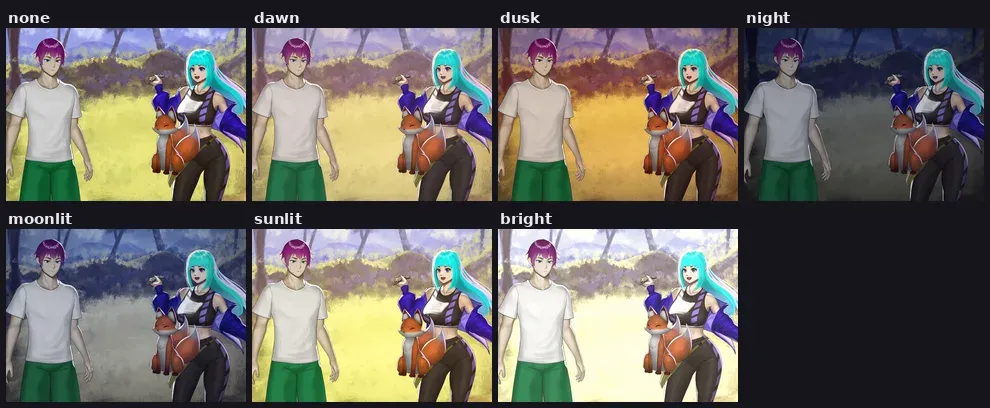
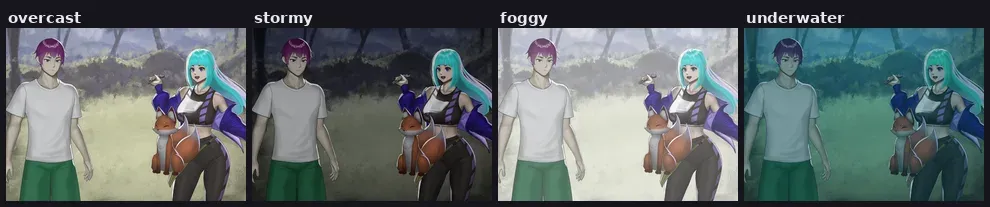

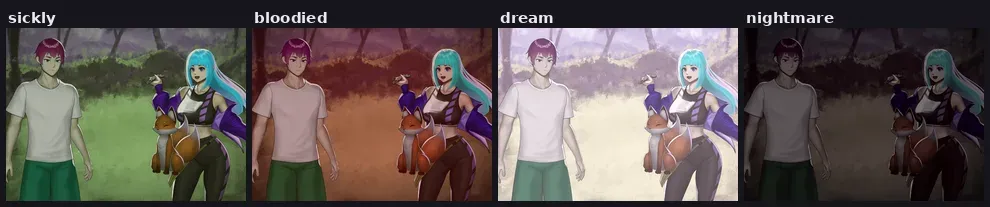
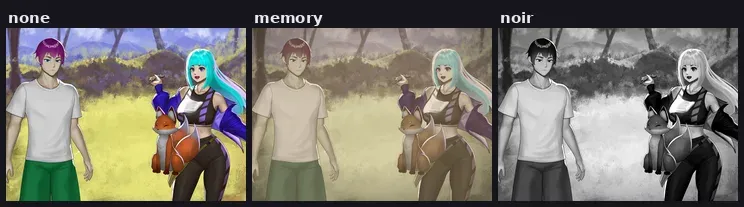
{grade: "night"}                    // full strength, ~0.8s crossfade
{grade: "night#0.5"}                // half strength
{grade: false}                      // fade back to daylight ("none" also works)
{grade: {duration: 3}}              // fade back to daylight over 3s

{grade: {preset: "night", amount: 0.5, duration: 2}}

// Manual control. Explicit fields override the preset.
{grade: {brightness: 0.5, saturate: 0.6, contrast: 1.06, hue: -10, tint: #16264f, tint_amount: 0.25, duration: 1.5}}

// Split toning: dark tones lean toward `shadow`, bright tones toward `highlight` (scene, actors, map)
{grade: {preset: "night", shadow: #1a2450, shadow_amount: 0.3, highlight: #c8d8ff, highlight_amount: 0.2}}

// Light over scene backgrounds only: sky gradient (#808080 = no change), vignette, rays
{grade: {preset: "dusk", sky_top: #372870, sky_mid: #ff7d37, sky_bottom: #2d1e50, sky_amount: 0.7, vignette: 0.5, rays: 0.5, rays_angle: -25}}
{grade: {preset: "dusk", rays: 0}}  // dusk without the light rays

// Characters take the grade at actor_strength (0.5 by default), so they stay readable over the plate
{grade: {preset: "night", actor_strength: 0.8}}   // actors sink further into the night
{grade: {preset: "noir", actor_strength: 1}}      // actors fully graded, like the scene

// An actor that gives off its own light skips the grade
{actor: "ghost->middle(grade=false)"}
| Field | Range | Applies to |
|---|---|---|
shadow, highlight | hex | scene, actors, map |
shadow_amount, highlight_amount | 0–1 | scene, actors, map |
sky_top, sky_mid, sky_bottom | hex | scene backgrounds |
sky_amount, vignette, rays | 0–1 | scene backgrounds |
rays_angle | degrees, 0 = vertical | scene backgrounds |
actor_strength | 0–1, default 0.5 | actors (share of the grade they take) |
Numbers need a leading zero — write 0.5, never .5. A hex colour may be written unquoted.
Ambient particles
| Kind | Look |
|---|---|
fireflies | Green-gold lights wandering low, each blinking on its own |
motes | Faint dust drifting up and across |
embers | Orange sparks rising and burning out |

{ambient: "fireflies"}              // fades in over the backgrounds, below the actors
{ambient: "fireflies#0.5"}          // half as many
{ambient: "embers"}                 // the old kind fades out, the new one fades in
{ambient: false}                    // fade out ("none" also works)

{grade: "dusk", ambient: "fireflies"}
Persists across rooms and saves until changed. Independent of grade.