Text Tags
Text tags are square-bracket markers written straight into prose. Some shape the text ([br], [code], [color], [size], [green] and the other named colours), some pace the typing animation: where it pauses, how fast it runs, and whether the paragraph moves on by itself. The rest animate the letters themselves.
Every tag is resolved at runtime by the same pipeline as |placeholders| and [[lore]], so they work in scene paragraphs, encounter text, $templates and narrative slots.
Nothing moves.[w] Then the door creaks open.[w=1] A hand reaches through.
Layout
| Tag | Renders as |
|---|---|
[br] | line break inside a paragraph |
[code]…[/code] | literal text – every special character inside is shown as written, no tags, placeholders or actions resolve |
Dear diary,[br]today the moth came back.
Write [code]|flag(coins)|[/code] to print the coin count.
Styling
| Tag | Renders as |
|---|---|
[color=#c8a2ff]…[/color] | text in that color – any CSS color: #hex, red, rgb(…) |
[size=1.2]…[/size] | text at 1.2× the surrounding size – a bare number is em; px, rem and % pass through |
The rune reads [color=#ffd166]Halt[/color] in letters [size=1.5]this tall[/size].
Named colours
Seven colour tags with shades picked to read on the dark text panels. Prefer them over [color=…]: the engine's own flash lines use them, so a game that retunes a shade retunes it everywhere.
| Tag | Colour | Engine uses it for |
|---|---|---|
[green]…[/green] | #4ade80 | gains: items added, party joins, positive statuses |
[red]…[/red] | #f87171 | losses: negative statuses |
[gold]…[/gold] | #fbbf24 | milestones: quests, learned skills and recipes |
[pink]…[/pink] | #f472b6 | – |
[purple]…[/purple] | #c084fc | – |
[blue]…[/blue] | #60a5fa | – |
[grey]…[/grey] | #9ca3af | – |
[green]**Moonleaf** has been added to your inventory![/green]
[gold]New strain uncovered: **Ember**.[/gold]
Each renders as <span class='text-<name>'>, so a game recolours one from its CSS:
.text-green {
  color: #7affd8;
}
They work in prose, choice labels, flash lines and notifications, including locale strings passed to game.addFlash().
All styling tags nest with each other and with **bold**, *italic*, effects and pacing tags.
Pacing
| Tag | Meaning |
|---|---|
[w] | Wait. Typing stops here and the continue arrow shows. A click or Space types the rest. |
[w=1.5] | Timed wait. Typing stops for 1.5 seconds, then continues on its own. |
[p] / [p=1.5] | Paragraph. Same as [w] / [w=1.5], followed by a line break. |
[nw] / [nw=1.5] | No wait. When the typing ends, the scene advances by itself (after 1.5 seconds). |
[fast] | Everything before the tag appears at once; typing starts after it. |
[cps=30]…[/cps] | Type the wrapped text at 30 characters per second. |
[cps=*2]…[/cps] | Type the wrapped text at twice the current rate. *0.5 halves it. Nests inside another [cps]. |
"I…"[w] "I don't know."[w=0.5] She looks away.

"Ready?"[p]"Set."[p]"Go!"

[cps=8]The old man speaks slowly, one word at a time.[/cps][cps=*3] The child answers in a rush.[/cps]

The corridor is empty. [fast]Then it isn't.

The lights go out.[nw=1]
How clicks interact with tags
- Click while typing – reveals the text up to the next
[w](or the end), the way a click already skips the animation. It runs straight through a timed wait. - Click on a
[w]– continues typing from that spot. - Click after the text ends – advances the scene, as before.
- Typing speed "none" – text lands at once, but
[w], timed waits and[nw]keep their meaning. A paragraph without pacing tags behaves exactly as it did. - Re-entering a paragraph the player has already seen shows it in full, with no waits.
[nw]
The scene advances only where a click would have: a paragraph ending in branch choices stays, and so does one held by block_scene_advance, disable_ui, hide_events or an open popup. Anything that changes the scene before the delay ends cancels the advance.
Effects
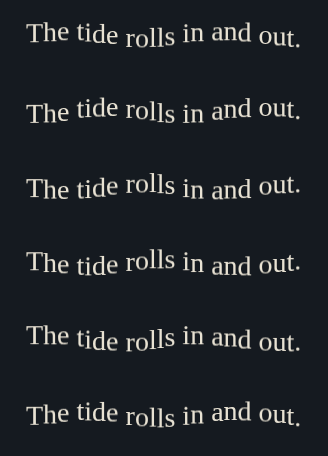
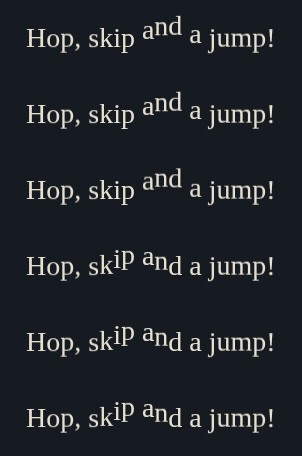
Wrap text in [name]…[/name] to animate it. Each visible letter becomes its own element, so the typing animation still reveals it one character at a time and the motion runs staggered along the word.
[shake]The ground trembles beneath you.[/shake]
[rainbow][wave]Letters can carry several effects at once.[/wave][/rainbow]
Only [glow]one word[/glow] needs to shine.
| Tag | Look |
|---|---|
[shake]…[/shake] | a fine, fast jitter |
[wave]…[/wave] | letters ride a slow sine wave |
[bounce]…[/bounce] | letters hop in turn |
[pulse]…[/pulse] | letters breathe in and out |
[rainbow]…[/rainbow] | colour cycles along the text |
[glow]…[/glow] | a pulsing halo in the text colour |
[spooky]…[/spooky] | a slow drift, a flicker and a green haze |
[flicker]…[/flicker] | irregular blackouts, like a failing light |
[blur]…[/blur] | a soft, static blur (a filter, no motion) |
[glitch]…[/glitch] | sudden skews with split colour fringes |
[freeze]…[/freeze] | letters shiver once, frost over to ice and hold still – plays once, never loops |
[shake]The ground trembles beneath you.[/shake]

[wave]The tide rolls in and out.[/wave]
[bounce]Hop, skip and a jump![/bounce]
[pulse]Your heart pounds in your chest.[/pulse]

[rainbow]A prism of colour spills across the wall.[/rainbow]

[glow]The rune burns with a steady light.[/glow]

[spooky]Something whispers from the dark...[/spooky]

[flicker]The lantern sputters and dies.[/flicker]

[blur]Your vision swims and softens.[/blur]

[glitch]REALITY IS NOT WHAT IT SEEMS.[/glitch]

[freeze]Time stops at a single word.[/freeze]

- Effects nest: the inner text carries every open effect.
- Bold, italic, lore links and
|placeholders|work inside an effect. - The backlog shows the text still; players who set their system to reduce motion see it still everywhere.
- Restyle or add effects from game CSS: every effect is a
.fx-<name>rule on.fx-charspans, which carry--i, the letter's index in the run. [freeze]starts from white; set--fx-freeze-fromon.fx-char.fx-freezein game CSS to start it from another colour.- An inline icon (an
<img>or an empty element such as a masked<span>) inside an effect moves with the letters around it.
Custom effects
Register your own tag from a game script. Every letter inside [name]…[/name] then gets the class fx-<name> – the same convention the built-ins follow – plus the classes of the base effects you list. Your game CSS styles .fx-<name>; a base lends its motion, so you only add what is different. Here, the spooky drift in a purple haze:
game.registerTextEffect('void', ['spooky']);
.fx-char.fx-void {
  color: #c084fc;
  text-shadow: 0 0 6px rgba(192, 132, 252, 0.75);
}
[void]Succumb... you know what you are.[/void]
Each letter of [void] carries fx-spooky fx-void. Writing the rule as .fx-char.fx-void lets your glow win over spooky's green one. Without the rule, [void] simply looks like [spooky].
A custom effect works everywhere a built-in one does: prose, choice labels, nesting. Its name is lowercase and cannot reuse a built-in tag. Without a base it carries only its own class, so the motion is whatever @keyframes your CSS gives .fx-<name>.
Notes
- Tags inside
[code]…[/code]stay literal. - Choice labels ignore pacing tags.
- The backlog stores the full text without waits;
[p]keeps its line break there. - Numbers are seconds and accept decimals:
[w=0.25].